1 pixel wide line parallel to the axis in HTML's Canvas element
I was playing around with HTML's Canvas element and I spent a whole day trying to figure out why I can't draw a 1-pixel wide straight line (parallel to the axes).
If you try dawing a black (#000000) straight line parallel to the axes, then for all odd numbered widths :
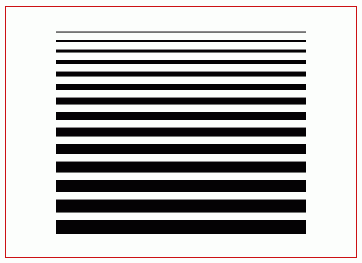 If you zooom in, you should be able to see the top and bottom border colours.
 This happens in all canvas-supported browsers (FF 3, FF 3.5 beta 4, Opera 10 beta, Chrome 2 beta, Safari 4 beta).
Reason : https://developer.mozilla.org/en/Canvas_tutorial/Applying_styles_and_colors#section_8
Mozilla's canvas tutorial on drawing shapes shows a screenshot which has the inner most rectangle of exactly 1 pixel wide and colour black. But viewing the example itself in the browser, shows otherwise - 2 pixel wide with faded colours.
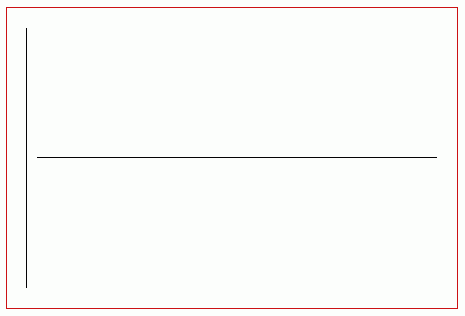
I've written a small function that draws exactly 1 pixel wide straight line parallel to the axis.
This happens in all canvas-supported browsers (FF 3, FF 3.5 beta 4, Opera 10 beta, Chrome 2 beta, Safari 4 beta).
Reason : https://developer.mozilla.org/en/Canvas_tutorial/Applying_styles_and_colors#section_8
Mozilla's canvas tutorial on drawing shapes shows a screenshot which has the inner most rectangle of exactly 1 pixel wide and colour black. But viewing the example itself in the browser, shows otherwise - 2 pixel wide with faded colours.
I've written a small function that draws exactly 1 pixel wide straight line parallel to the axis.
Vanakkam !
- the first line is of colour #9d9d9d and the last one is of #8d8d8d
- The width of the line is one pixel more
If you zooom in, you should be able to see the top and bottom border colours.
This happens in all canvas-supported browsers (FF 3, FF 3.5 beta 4, Opera 10 beta, Chrome 2 beta, Safari 4 beta).
Reason : https://developer.mozilla.org/en/Canvas_tutorial/Applying_styles_and_colors#section_8
Mozilla's canvas tutorial on drawing shapes shows a screenshot which has the inner most rectangle of exactly 1 pixel wide and colour black. But viewing the example itself in the browser, shows otherwise - 2 pixel wide with faded colours.
I've written a small function that draws exactly 1 pixel wide straight line parallel to the axis.
| Canvas, HTML, JavaScript | 1 comments | Saturday, May 23, 2009 |