Code

Coding, Programming & Algorithms, Tips, Tweaks & Hacks
Search

Showing posts with label JavaScript. Show all posts

Get the element that triggered the event in an event handler function

A lot of people seem to get confused when trying to get the element that triggered the event in an event handler function. this or $(this) returns the parent element of the target.

Even before jQuery, vanilla JavaScript worked.

http://www.quirksmode.org/js/events_properties.html
JavaScript
function getTarget(e)
{
    var e = e || window.event, t;

    if (e.target) t = e.target;
    else if (e.srcElement) t = e.srcElement;

    if (t.nodeType == 3) // defeat Safari bug
    t = t.parentNode;

    return t;
}
JavaScript
Vanakkam !

Commas in HTML INPUT textfields for better readability

Sometimes, when a user enters numbers into a HTML INPUT text field, he/she enters commas too for readability esp in the case of financial inputs.

But when we send the input data via a form to the backend script for storing into a database, say MySQL database, we don't want the commas in the SQL INSERT statement.

So here's a script to show the commas while typing and remove the commas on hitting the submit button.


Vanakkam !

Alexa Rank function in Google Apps Script

Google Apps Script is JavaScript based scripting for many of Google's services, most noteably, Google Spreadsheets, like VB Macros for Excel.
There are some subtilities in JavaScript, like window and document not being defined. Though the scripting is mostly JavaScript, it is not 100% native JavaScript since it runs in an app and not in the browser.
Currently Google Apps Script has a computeHmacSha256Signature() function but Amazon's AWIS requires a SHA-1 key for its signature which can be obtained from jsSHA. I've clipped the jsSHA code from here as its too lengthy. You can download it from sourceforge, copy-paste the code from /src/sha1.js. A small change is required though. Change b64pad="" to b64pad="=".

Google Apps Script
/*
* When defining a local function 'foo' in a closure, at the end, it is declared global by window.foo = foo
* Google Apps Script has window and document undefined
*/
var window = {};

// Amazon Web Information Services
var AWIS =
{
SERVICE_ENDPOINT : 'http://awis.amazonaws.com/?',
ACTION : 'UrlInfo',
RESPONSE_GROUP : 'Rank',
ACCESS_KEY_ID : "your-access-id",
SECRET_ACCESS_KEY : "your-secret-key"
}

/*
* Validate if a string is of proper domain
* @param String domain
* @return Boolean false if invalid, true if valid
* There are many more tests, this one is just to avoid a bad cell-value
*/
function isValidDomain(domain)
{
if (domain.indexOf(".") < 1) return false;
if (domain.indexOf(":") != -1) return false;
return true;
}

/*
* Get just the hostname from a URL
* @param String URL
* @return String hostname
* http://en.wikipedia.org/wiki/URI_scheme#Examples
*/
function getHostname(url)
{
return url.replace(/http(s*):\/\/(.[^/\?]+)(\/*)(.*)$/g, "$2").toLowerCase();
}

/*
* Validate cellvalue to be of a proper domain
* @param String domain cell-value
* @return Integer Alexa Rank
*/
function getAlexaRank(domain)
{
if (!isValidDomain(domain)) return domain + " is not a valid domain";
var hostname = getHostname(domain);

if (AWIS.ACCESS_KEY_ID == "" || AWIS.ACCESS_KEY_ID == "undefined") return "Error : AWS AccessKey not yet set";
if (AWIS.SECRET_ACCESS_KEY == "" || AWIS.SECRET_ACCESS_KEY == "undefined") return "Error : AWS SecretKey not yet set";

var timestamp = generate_timestamp();
var shaObj = new window.jsSHA(AWIS.ACTION + timestamp, 'ASCII');
var signature = shaObj.getHMAC(AWIS.SECRET_ACCESS_KEY, 'ASCII', 'B64');
var awis_url = AWIS.SERVICE_ENDPOINT + "AWSAccessKeyId=" + AWIS.ACCESS_KEY_ID + "&Action=" + AWIS.ACTION + "&ResponseGroup=" + AWIS.RESPONSE_GROUP + "&Timestamp=" + encodeURIComponent(timestamp) + "&Signature=" + encodeURIComponent(signature) + "&Url=" + encodeURIComponent(hostname);

try
{
var response = UrlFetchApp.fetch(awis_url);
}
catch (err)
{
return "Error in URL : " + awis_url;
}

var sXML = response.getContentText();
var oXML = Xml.parse(sXML, false);
var root = oXML.getElement();
var Response = root.getElements("http://awis.amazonaws.com/doc/2005-07-11","Response");
var UrlInfoResult = Response[0].getElements("http://awis.amazonaws.com/doc/2005-07-11","UrlInfoResult");
var Alexa = UrlInfoResult[0].getElements("http://awis.amazonaws.com/doc/2005-07-11","Alexa");
var TrafficData = Alexa[0].getElements("http://awis.amazonaws.com/doc/2005-07-11","TrafficData");
var Rank = TrafficData[0].getElements("http://awis.amazonaws.com/doc/2005-07-11","Rank");
return Rank[0].getText();
}

/*
* Generate Timestamp of current time
* http://www.w3.org/TR/xmlschema-2/#dateTime
* @return String UTC time in yyyy-MM-dd'T'HH:mm:ss.SSS'Z' format
*/
function generate_timestamp()
{
var now = new Date();

var yyyy = now.getUTCFullYear();
var mm = now.getUTCMonth() < 9 ? "0" + (now.getUTCMonth() + 1) : (now.getUTCMonth() + 1);
var dd = now.getUTCDate() < 10 ? "0" + now.getUTCDate() : now.getUTCDate();

var HH = now.getUTCHours() < 10 ? "0" + now.getUTCHours() : now.getUTCHours();
var ii = now.getUTCMinutes() < 10 ? "0" + now.getUTCMinutes() : now.getUTCMinutes();
var ss = now.getUTCSeconds() < 10 ? "0" + now.getUTCSeconds() : now.getUTCSeconds();

return yyyy + "-" + mm + "-" + dd + "T" + HH + ":" + ii + ":" + ss + ".000Z";
}

/*
* Copy /src/sha1.js from jsSHA (http://jssha.sourceforge.net)
* Currently Google Apps Script has a computeHmacSha256Signature() function but Amazon's AWIS requires a SHA-1 key for its signature
* Also, change b64pad="" to b64pad="="
*/
(function(){var charSize=8,b64pad="=",hexCase=0,str2binb=function(a) ... ;window.jsSHA=jsSHA}());
JavaScript
Vanakkam !

Trigerring error() on a cross-domain AJAX request

Opera was the only browser that triggered the error function when an illegal cross-domain AJAX request was being tried via jQuery.

HTML + JavaScript
<!DOCTYPE html>
<html lang="en">
<head>
<meta charset="utf-8" />
<meta http-equiv="Content-Type" content="text/html;charset=utf-8" >
<title>XDOM</title>
<script type="text/javascript" src="http://ajax.microsoft.com/ajax/jquery/jquery-1.4.2.min.js"></script>
<script type="text/javascript">
$(document).ready(function()
{
    $.ajax(
    {
        url: "http://www.microsoft.com/robots.txt",
        dataType: "text",
        beforeSend: function(XMLHttpRequest)
        {
            $('body').append("sending ... <br/>");
        },
        success: function(data)
        {
            $('body').append("<b>success :</b> data = " + data + "<br/>");
        },
        error: function(XMLHttpRequest, textStatus, errorThrown)
        {
            $('body').append("<b>error :</b> textStatus = " + textStatus + ", errorThrown = " + errorThrown + "<br/>");
        },
        complete: function(XMLHttpRequest, textStatus)
        {
            $('body').append("<b>complete :</b> textStatus = " + textStatus + "<br/>");
        }
    });
});
</script>
</head>
<body></body>
</html>
HTML + JavaScript

FireFox, Chrome & Safari :

sending ...
success : data =
complete : textStatus = success

Opera :

sending ...
error : textStatus = null, errorThrown = ReferenceError: Security violation
complete : textStatus = undefined

Internet Explorer just didn't fire any of the events - the debugger reported a security violation.

Vanakkam !

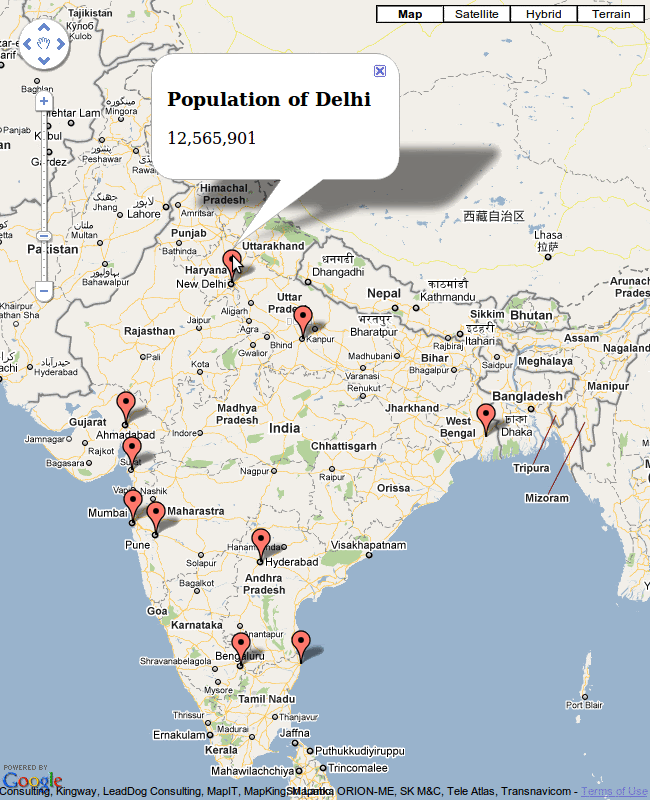
Google Visualization & Google Maps using GeoCoding

Flash & JavaScript examples of using markers & geocoding on Maps.
I've never been a big fan of Flash, given that that's what dominates the web design animation spectrum.
Agreed that you can make things look much cooler very easily using Flash, while achieving the same UI using JavaScript may take 10 times the effort. But this should change over time with the development of HTML5's canvas element.
With Google's Visualization Geomap API you can get the nice map interface that you've seen in Google Analytics.
But the Maps API is lighter and you can move it around & zoom using the mouse.

Google Visualization Geomap API
<!DOCTYPE html>
<html lang="en">
<head>
<meta charset="utf-8" />
<meta http-equiv="Content-Type" content="text/html;charset=utf-8" >
<title>Google Visualization Geomap API</title>
<script type="text/javascript" src="http://www.google.com/jsapi"></script>
<script type="text/javascript">
google.load('visualization', '1', {'packages': ['geomap']});
var population =
[
['Mumbai',13830884],['Delhi',12565901],
['Bangalore',5438065],['Kolkata',5138208],
['Chennai',4616639],['Hyderabad',4068611],
['Ahmedabad',3959432],['Pune',3446330],
['Surat',3344135],['Kanpur',3221435],
['Jaipur',3210570],['Lucknow',2750447],
['Nagpur',2447063],['Patna',1875572],
['Indore',1854930],['Thane',1807616],
['Bhopal',1792203],['Ludhiana',1740247],
['Agra',1686976],['Pimpri Chinchwad',1637905]
];
google.setOnLoadCallback(function()
{
var data = new google.visualization.DataTable();
data.addColumn('string', 'City');
data.addColumn('number', 'Population');
data.addRows(population);
var geomap = new google.visualization.GeoMap(document.getElementById('geomap'));
geomap.draw(data, {width:'500px',height:'500px',region:'IN',dataMode:'markers',showLegend:false});
});
</script>
</head>
<body>
<div id="geomap" style="width:500px;height:500px;"></div>
</body>
</html>
JavaScript

Google Visualization in Browser

Google Maps & Geocoder
<!DOCTYPE html>
<html lang="en">
<head>
<meta charset="utf-8" />
<meta http-equiv="Content-Type" content="text/html;charset=utf-8" >
<title>Google Maps and GeoCoder API</title>
<script type="text/javascript" src="http://www.google.com/jsapi"></script>
<script type="text/javascript">
google.load('maps', '3', {"other_params":"sensor=true"});
var population =
[
['Mumbai','13,830,884'],['Delhi','12,565,901'],
['Bangalore','5,438,065'],['Kolkata','5,138,208'],
['Chennai','4,616,639'],['Hyderabad','4,068,611'],
['Ahmedabad','3,959,432'],['Pune','3,446,330'],
['Surat','3,344,135'],['Kanpur','3,221,435']
];
var map;
google.setOnLoadCallback(function()
{
var point = new google.maps.LatLng(24.046464, 81.342773);
var options =
{
zoom:5,
center:point,
mapTypeId: google.maps.MapTypeId.ROADMAP
};
map = new google.maps.Map(document.getElementById("geomap"), options);
geocoder = new google.maps.Geocoder();
for (var i = 0; i < population.length; i++)
{
geocoder.geocode({'address':population[i][0]}, createMarker(i));
}
});

function createMarker(i)
{
return function(results, status)
{
if (status == google.maps.GeocoderStatus.OK)
{
var infowindow = new google.maps.InfoWindow({ content: "<div><h3>Population of " + population[i][0] + "</h3><p>" + population[i][1] + "</p></div>" });
var marker = new google.maps.Marker(
{
position:results[0].geometry.location,
map:map,
title:population[i][1]
});
google.maps.event.addListener(marker, 'click', function() { infowindow.open(map,marker); });
}
else
{
alert("Geocode was not successful for the following reason: " + status);
}
}
}
</script>
</head>
<body>
<div id="geomap" style="width:650px;height:800px;"></div>
</body>
</html>
JavaScript

Google Maps

Limitations with Visualization API :

  • A maximum of 400 entries (markers)
  • Much slower if the data format is an address instead of a Latitude/Longitude pair
  • If you are targetting India, Maps is the better way to go as the Visualization API has cut off a major portion of the J&K !

Limitations with Google Maps :

  • Geocoder has a limit of 2500 requests per day, and looks about like 10 requests at a time.
  • Need to center the map and adjust zoom level manually to show withing the bounding div. Visualization API does this automatically by specifying region:'IN'

In both cases, storing Latitude/Longitude pairs offline and then geo-locating the same renders a whole lot faster.

Vanakkam !

Loading AJAX locally, without a webserver

So far, while developing web applications I have always taken one point into assumption - that it has to run on a web-server. But when dealing with pure client-side web apps, we often overlook the fact that it should be able to be run by simply double-clicking on the homepage file (index.html). When XMLHttpRequest's readyState reaches a value of 4, we further check for a response code 200 from the web-server before doing anything with the responseText / responseXML. But when running it locally - not on a webserver, the status code value will alway be 0.
JavaScript
window.onload = function()
{
    var xhr = NewXMLHttpRequest();
    if (xhr != false)
    {
        try
        {
            xhr.open("GET", "local-ajax.txt", true);
            xhr.onreadystatechange = xhr_load;
            xhr.setRequestHeader("Connection", "close");
            xhr.send(null);
        }
        catch(e)
        {
            alert("Error Loading File\n" + e.code + "\n" + e.message);
        }
    }
    else
    {
        alert("AJAX not supported");
    }
}

function xhr_load()
{
    switch (this.readyState)
    {
        case 1: // Open
        case 2: // Send
        case 3: // Receiving
        break;

        case 4: // Loaded
        if (this.status == 200 || (this.status == 0 && document.location.protocol == "file:")) // OK
        {
            var text = this.responseText;
            alert(text);
        }
        break;
    }
}

function NewXMLHttpRequest()
{
    var xhr = false;

    if (window.XMLHttpRequest) // native XMLHttpRequest object
    {
        try { xhr = new XMLHttpRequest(); }
        catch(e) { xhr = false; }
    }
    else if (window.ActiveXObject) // IE/Windows ActiveX version
    {
        try { xhr = new ActiveXObject("Msxml2.XMLHTTP"); }
        catch(e)
        {
            try { xhr = new ActiveXObject("Microsoft.XMLHTTP"); }
            catch(e) { xhr = false; }
        }
    }

    return xhr;
}
JavaScript 1.5
Vanakkam !

1 pixel wide line parallel to the axis in HTML's Canvas element

I was playing around with HTML's Canvas element and I spent a whole day trying to figure out why I can't draw a 1-pixel wide straight line (parallel to the axes). If you try dawing a black (#000000) straight line parallel to the axes, then for all odd numbered widths :
  • the first line is of colour #9d9d9d and the last one is of #8d8d8d
  • The width of the line is one pixel more
Canvas Lines
<html>
<head>
        <meta http-equiv="Content-Type" content="text/html;charset=iso-8859-1"/>
        <title>HTML5 - Canvas</title>
        <meta http-equiv="Content-Language" content="en-us"/>
        <script type="text/javascript">
        function foo()
        {
            var canvas = document.getElementById("canvas-line");
            var ctx = canvas.getContext('2d');
            
            for (i = 1, j = 0; i < 15; i++, j+=i+7)
            {
                ctx.beginPath();
                ctx.lineWidth = i;
                ctx.strokeStyle = "black";
                ctx.moveTo(50,25 + j);
                ctx.lineTo(300,25 + j);
                ctx.stroke();
            }
        }

        </script>
</head>
<body onload="foo()">
<canvas id="canvas-line" width="350" height="250" style="border:1px solid #cf1313; margin-left:100px;"></canvas>
</body>
</html>
HTML 5 + JavaScript
The above should give an output like this : If you zooom in, you should be able to see the top and bottom border colours. This happens in all canvas-supported browsers (FF 3, FF 3.5 beta 4, Opera 10 beta, Chrome 2 beta, Safari 4 beta). Reason : https://developer.mozilla.org/en/Canvas_tutorial/Applying_styles_and_colors#section_8 Mozilla's canvas tutorial on drawing shapes shows a screenshot which has the inner most rectangle of exactly 1 pixel wide and colour black. But viewing the example itself in the browser, shows otherwise - 2 pixel wide with faded colours. I've written a small function that draws exactly 1 pixel wide straight line parallel to the axis.
1 pixel wide Canvas line
<html>
<head>
        <meta http-equiv="Content-Type" content="text/html;charset=iso-8859-1"/>
        <title>HTML5 - Canvas</title>
        <meta http-equiv="Content-Language" content="en-us"/>
        <script type="text/javascript">
        /*
        draw1pxLinePA
            Draw a 1 pixel width line parallel to the axis
        Parameters
            x : x coordinate
            y : y coordinate
            l : length
            o : orientation
                0 = horizontal (default)
                1 = vertical
            bg : erase-with colour - for background
        */
        CanvasRenderingContext2D.prototype.draw1pxLinePA = function(x, y, l, o, bg)
        {
            o = o || 0;
            bg = bg || "white";

            this.beginPath();
            this.lineWidth = 2; // 1 creates a 2 pixel wide line with fading
            this.moveTo(x, y);
            this.lineTo(x + (l * !o), y + (l * o));
            this.stroke();

            var strokeStyle = this.strokeStyle; // Save current strokeStyle

            // Erase the extra line
            this.beginPath();
            this.lineWidth = 2;
            this.strokeStyle = bg;
            this.moveTo(x + (1 * o), y + (1 * !o));
            this.lineTo(x + (l * !o) + (1 * o), y + (l * o) + (1 * !o));
            this.stroke();

            this.strokeStyle = strokeStyle; // Restore strokeStyle
        }

        function foo()
        {
            var canvas = document.getElementById("canvas-line");
            var ctx = canvas.getContext('2d');

            ctx.strokeStyle = "black";
            ctx.draw1pxLinePA(20, 20, 260, 1);
            ctx.draw1pxLinePA(30, 150, 400);
        }

        </script>
</head>
<body onload="foo()">

<canvas id="canvas-line" width="450" height="300" style="border:1px solid #cf1313; margin-left:100px;"></canvas>

</body>
</html>
HTML 5 + JavaScript
Vanakkam !

Property getters & setters

In traditional OOP, if we wanted to get or set an object's private member, we would need to write a public method to do the job.
The reason behind making a member data private and then accessing it through a public method is to avoid the implementing-user to access it directly.
There can be many reasons for prohibiting direct access to member data to the implementing-code.
For example, you may want a radius of a Circle to be within the range of 10 - 500.

C++: Traditional OOP
class Circle
 {
        private:
          int radius;

        public:
          Circle(int radius = 15)
           {
                  setRadius(radius);
           }

          void setRadius(int radius)
           {
                  if (radius < 10 || radius > 500)
                   {
                          this->radius = -1;
                          cout << "Radius must be within the range of 10 - 500" << endl;
                   }
                  else
                   this->radius = radius;
           }

          int getRadius()
           {
                  return this->radius;
           }
 }

void main()
 {
        Circle c = Circle();
        c.setRadius(25);
        cout << c.getRadius();
 }
C++

In languages like PHP & Python & PERL which have a weak type system, a further check of the data type may be necessary.
But for Python unfortunately even traditional getter & setter methods cannot be implemted because Python doesn't have a public or private. Everything is public by default - though a member can be made private by prefixing two underscores to it. But this is only for convention, it doesn't really serve its true purpose.

PHP 5 and C# .NET have a getter and setter method feature, making it look like we're accessing the data member directly.

PHP
<?php
class Circle
 {
        private $radius; # integer

        # Constructor
        public function __construct($radius = 15)
         {
                self::__set('radius', $radius);
         }

        # Setter
        public function __set($name, $value)
         {
                switch ($name)
                 {
                        case 'radius':

                          if (!is_numeric($value)) # is_int() for strong type checking
                           throw new Exception('Radius must be of a numeric type');

                          if ($value < 10 || $value > 500)
                           throw new Exception('Radius must be within the range of 10 - 500');

                          $this->radius = $value;

                        break;

                        default:
                          throw new Exception("Attempt to set a non-existing property: $name");
                        break;
                 }
         }

        # Getter
        public function __get($name)
         {
                if (in_array($name, array('radius')))
                 return $this->$name;

                switch ($name)
                 {
                        default:
                          throw new Exception("Attempt to get a non-existing property: $name");
                        break;
                 }
         }

 }

$c = new Circle();
$c->radius = 25;
echo $c->radius;
>
PHP 5.x
C#
using System;

public class Circle
 {
        private int __radius = 5;

        public Circle()
         {
         }

        public Circle(int radius)
         {
                this.radius = radius; // This will call the property defined below
         }

        public int radius // Property getter/setter name cannot be the same as the member variable name
         {
                get
                 {
                        return __radius;
                 }

                set
                 {
                        if (value < 10 || value > 500)
                         throw new Exception("Radius must be within the range of 10 - 500");

                        __radius = value;
                 }
         }
 }

public class main
 {
        public static void Main(string[] args)
         {
                Circle c = new Circle(); // Circle c = new Circle(5); will throw an Exception
                c.radius = 25;
                Console.WriteLine(c.radius);
         }
 }
.NET 2.0

C# .NET 3.0 has introduced Automatic Properties where you don't need to specify code for the getter & setter - the compiler takes generates the method body.

JavaScript does seem to have a getter and setter method which I came across just now when searching for the official source to Java 7's new features' documentation, but :

  • only within an object initializer - not inside a function so it doesn't seem to be of much use as we can't create instances
  • doesn't hide the member from being accessed directly
  • doesn't work in IE.

JavaScript
var someObj =
 {
        a : 7,
        get b()
         {
                return this.a * 3;
         },
        set c(x)
         {
                this.a = x / 2;
         }
 }

someObj.foo1 = function()
 {
        //
 }

alert(someObj.a); // 7
alert(someObj.b); // 21
someObj.c = 5; alert(someObj.a); // 2.5
someObj.foo1();
JavaScript 1.5

The Getter & Setter feature does not seem to be a much "wanted" feature in the Java community.
Still, this has been proposed by Rémi Forax for JDK 7.

Java: Proposal
public class Circle
 {
        private int __radius = 5;

        public Circle()
         {
         }

        public Circle(int radius)
         {
                this.radius = radius; // This will call the property defined below
         }

        public property int radius // Property getter/setter name cannot be the same as the member variable name
         {
                get
                 {
                        return __radius;
                 }

                set (int radius)
                 {
                        if (radius < 10 || radius > 500)
                         throw new Exception("Radius must be within the range of 10 - 500");

                        __radius = radius;
                        // firePropertyChange(radius);
                 }
         }

        public static void main(String[] args)
         {
                Circle c = new Circle(2); // Circle c = new Circle(5); will throw an Exception
                c.radius = 25;
                System.out.println(c.radius);
         }
 }
JDK 7
Vanakkam !

Form submission using AJAX & HTML

One of the biggest concerns using AJAX based form submissions are JavaScript related issues :
  • What if JavaScript is disabled or not available on the client's browser ?
  • What if XMLHttpRequest / Msxml2.XMLHTTP / Microsoft.XMLHTTP aren't available ?
  • What if the creation of XMLHttpRequest object failed for some reason ?
  • What if all the JavaScript scripts didn't load properly and screwed up the damn thing ?
  • What if the user clicked the button much faster than the scripts to completely load ? You must be on a real slow connection for this to happen.
The only solution is to give your users the option to automatically fall back to the normal form submission if AJAX doesn't work. Relying solely on client side scripting should only be done only if the application demands it.
HTML
<form id="Comment-Form" action="http://mydomain.com/PostComment" method="post">
<div id="Comment-Box">
<table>
<tr><th>Leave a Comment</th></tr>
<tr><td id="Comment-Box-Msg" style="display:none"></td></tr>
<tr><td><textarea name="Comment" id="Comment-Reply" rows="10" cols="50"></textarea></td></tr>
<tr><td style="text-align:center">
<input type="submit" value="Post Comment" name="Submit" id="Comment-Button"/>
</td></tr>
</table>
</div>
</form>
HTML 4.01
JavaScript
window.onload = function() { init(); }
function init()
 {
        /* 
        This is set only after the entire page is loaded,
        so if the button is clicked way before its loaded,
        it'll 'normal' submit to the form's action value
        */
        document.getElementById("Comment-Button").onclick = PostCommment;
 }
function PostCommment()
 {
        // AJAX error : switch to <form> submit
        if (ajax_error) document.getElementById("Comment-Form").submit();

        // Do the form submission via AJAX

        // To stop the <form> being submitted, since its done via AJAX
        return false;
 }
Javascript 1.5
This way, it ensures that if there is a problem with JavaScript or AJAX in particular, you can always fall back to the normal form submission.
Vanakkam !

Generating a Random String

PHP
<?php
class RandomText
 {
        const RAND_NUMBERS       = 1;
        const RAND_SMALL_LETTERS = 2;
        const RAND_CAP_LETTERS   = 4;
        const RAND_ALL           = 7;

        /**
         * @access public
         * @param Type (INT) One of the random constants RAND_*
         * @NoOfChars [INT] Optional - No of characters to generate
         * @return (string) random string
         * @example echo RandomText::Random_String(RandomText::RAND_NUMBERS + RandomText::RAND_CAP_LETTERS, 25);
         */
 	public static function Random_String($Type = self::RAND_NUMBERS, $NoOfChars = 6)
 	 {
 	 	$strList = array();

 	 	// Convert to binary format and find out what combination of random characters are required
 	 	$binType = base_convert($Type, 10, 2);

 	 	// Loop through the bits from Right To Left
 	 	for ($i = strlen($binType) - 1; $i >= 0; $i--)
 	 	 {
 	 	 	if ($binType[$i])
 	 	 	 {
 	 	 	 	switch (pow(2, strlen($binType) - $i - 1))
 	 	 	 	 {
 	 	 	 	 	default:

 	 	 	 	 	case self::RAND_NUMBERS:
 	 	 	 	 	 $Ascii_Range = array(48, 57);  // Numbers - Characters 0 to 9
 	 	 	 	 	break;

 	 	 	 	 	case self::RAND_SMALL_LETTERS:
   	 	 	 	 	 $Ascii_Range = array(97, 122); // Small Letters - Characters a to z
 	 	 	 	 	break;

 	 	 	 	 	case self::RAND_CAP_LETTERS:
 	 	 	 	 	 $Ascii_Range = array(65, 90);  // Capital Letters - Characters A to Z
 	 	 	 	 	break;
 	 	 	 	 }

 	 	 	 	for ($j = $Ascii_Range[0]; $j <= $Ascii_Range[1]; $j++)
 	 	 	 	 $strList[] = chr($j);
 	 	 	 }
 	 	 }

 	 	$RndString = "";
 	 	for ($i = 0; $i < $NoOfChars; $i++)
 	 	 $RndString .= $strList[rand(0, count($strList) - 1)];

 	 	return $RndString;
 	 }
 }

echo RandomText::Random_String(RandomText::RAND_NUMBERS + RandomText::RAND_CAP_LETTERS, 25);
?>
PHP 5.2.3
C#
using System;
using System.Text;

public class RandomText
 {
        public const int RAND_NUMBERS       = 1;
        public const int RAND_SMALL_LETTERS = 2;
        public const int RAND_CAP_LETTERS   = 4;
        public const int RAND_ALL           = 7;

        public static string Random_String()
         {
                return Random_String(RAND_NUMBERS, 6);
         }

        public static string Random_String(int Type)
         {
                return Random_String(Type, 6);
         }

        public static string Random_String(int Type, int NoOfChars)
         {
                StringBuilder strList = new StringBuilder();
                int[] Ascii_Range;
                int i;

                // Convert to binary format and find out what combination of random characters are required
                string binType = Convert.ToString(Type, 2);

                // Loop through the bits from Right To Left
                for (i = binType.Length - 1; i >= 0; i--)
                 {
                        if (binType[i] == '1')
                         {
                                switch ((int)Math.Pow(2, binType.Length - i - 1))
                                 {
                                        default:

                                        case RAND_NUMBERS:
                                         Ascii_Range = new int[] {48, 57};  // Numbers - Characters 0 to 9
                                        break;

                                        case RAND_SMALL_LETTERS:
                                         Ascii_Range = new int[] {97, 122};  // Small Letters - Characters a to z
                                        break;

                                        case RAND_CAP_LETTERS:
                                         Ascii_Range = new int[] {65, 90};  // Capital Letters - Characters A to Z
                                        break;
                                 }

                                for (int j = Ascii_Range[0]; j <= Ascii_Range[1]; j++)
                                 strList.Append((char)j);
                         }
                 }

 	 	StringBuilder RndString = new StringBuilder();
 	 	Random rnd = new Random();
 	 	
 	 	for (i = 0; i < NoOfChars; i++)
 	 	 RndString.Append(strList[rnd.Next(strList.Length - 1)]);

 	 	return RndString;
         }

        public static void Main(string[] args)
         {
                Console.WriteLine(RandomText.Random_String(RandomText.RAND_NUMBERS + RandomText.RAND_CAP_LETTERS, 25));
         }
 }
.NET 2.0
Java
import java.io.*;
import java.util.Random;

public class RandomText
 {
        public static final int RAND_NUMBERS       = 1;
        public static final int RAND_SMALL_LETTERS = 2;
        public static final int RAND_CAP_LETTERS   = 4;
        public static final int RAND_ALL           = 7;

        public static String Random_String()
         {
                return Random_String(RAND_NUMBERS, 6);
         }

        public static String Random_String(int Type)
         {
                return Random_String(Type, 6);
         }

        public static String Random_String(int Type, int NoOfChars)
         {
                StringBuilder strList = new StringBuilder();
                int[] Ascii_Range;
                int i;

                // Convert to binary format and find out what combination of random characters are required
                String binType = Integer.toString(Type, 2); // Type.toString(2);

                // Loop through the bits from Right To Left
                for (i = binType.length() - 1; i >= 0; i--)
                 {
                        if (binType.charAt(i) == '1')
                         {
                                switch ((int)Math.pow(2, binType.length() - i - 1))
                                 {
                                        default:

                                        case RAND_NUMBERS:
                                         Ascii_Range = new int[] {48, 57};  // Numbers - Characters 0 to 9
                                        break;

                                        case RAND_SMALL_LETTERS:
                                         Ascii_Range = new int[] {97, 122};  // Small Letters - Characters a to z
                                        break;

                                        case RAND_CAP_LETTERS:
                                         Ascii_Range = new int[] {65, 90};  // Capital Letters - Characters A to Z
                                        break;
                                 }

                                for (int j = Ascii_Range[0]; j <= Ascii_Range[1]; j++)
                                 strList.append((char)j);
                         }
                 }

                StringBuilder RndString = new StringBuilder();
                Random rnd = new Random();

                for (i = 0; i < NoOfChars; i++)
                 RndString.append(strList.charAt(rnd.nextInt(strList.length() - 1)));

                return RndString.toString();
         }

        public static void main(String[] args) throws Exception
         {
                System.out.println(RandomText.Random_String(RandomText.RAND_NUMBERS + RandomText.RAND_CAP_LETTERS, 25));
         }
 }
JDK 6.0
JavaScript
function RandomText()
 {
        this.RAND_NUMBERS       = 1;
        this.RAND_SMALL_LETTERS = 2;
        this.RAND_CAP_LETTERS   = 4;
        this.RAND_ALL           = 7;

        this.Random_String = function(Type, NoOfChars)
         {
                var strList = "";
                var Ascii_Range;
                var i;

                // Convert to binary format and find out what combination of random characters are required
                binType = Type.toString(2);

                // Loop through the bits from Right To Left
                for (i = binType.length - 1; i >= 0; i--)
                 {
                        if (binType[i] == '1')
                         {
                                switch (Math.pow(2, binType.length - i - 1))
                                 {
                                        default:

                                        case this.RAND_NUMBERS:
                                         Ascii_Range = new Array(48, 57);  // Numbers - Characters 0 to 9
                                        break;

                                        case this.RAND_SMALL_LETTERS:
                                         Ascii_Range = new Array(97, 122); // Small Letters - Characters a to z
                                        break;

                                        case this.RAND_CAP_LETTERS:
                                         Ascii_Range = new Array(65, 90);  // Capital Letters - Characters A to Z
                                        break;
                                 }

                                for (var j = Ascii_Range[0]; j <= Ascii_Range[1]; j++)
                                 strList += String.fromCharCode(j);
                         }
                 }

                var RndString = "";
                for (i = 0; i < NoOfChars; i++)
                 RndString += strList[Math.floor(Math.random() * strList.length)];

                return RndString;
         }
 }

var oRandomText = new RandomText();
alert(oRandomText.Random_String(oRandomText.RAND_NUMBERS + oRandomText.RAND_CAP_LETTERS, 25));
JavaScript 1.5
Python
import array
import random

def int2bin(n):
    "Convert an integer to binary - no built-in function"
    bStr = ''
    while n > 0:
          bStr = str(n % 2) + bStr
          n = n >> 1
    return bStr

class RandomText:

      RAND_NUMBERS       = 1;
      RAND_SMALL_LETTERS = 2;
      RAND_CAP_LETTERS   = 4;
      RAND_ALL           = 7;

      def Random_String(Type = RAND_NUMBERS, NoOfChars = 6):
          strList = array.array('c', '')

          # Convert to binary format and find out what combination of random characters are required
          binType = int2bin(Type)

          # Loop through the bits from Right To Left
          for i in range(len(binType) - 1, -1, -1):

              if binType[i] == '1':

                 x = 2 ** (len(binType) - i - 1)

                 if x == RandomText.RAND_NUMBERS:
                    Ascii_Range = [48, 57]   # Numbers - Characters 0 to 9
                 elif x == RandomText.RAND_SMALL_LETTERS:
                    Ascii_Range = [97, 122]  # Small Letters - Characters a to z
                 elif x == RandomText.RAND_CAP_LETTERS:
                    Ascii_Range = [65, 90]   # Capital Letters - Characters A to Z
                 else:
                    Ascii_Range = [48, 57]   # Numbers - Characters 0 to 9

                 for j in range(Ascii_Range[0], Ascii_Range[1] + 1):
                    strList.append(chr(j))

              RndString = array.array('c', '')

              for i in range(0, NoOfChars):
                  RndString.append(strList[random.randint(0, len(strList) - 1)])

          return RndString.tostring()

      Random_String = staticmethod(Random_String)


print RandomText.Random_String(RandomText.RAND_NUMBERS + RandomText.RAND_CAP_LETTERS, 25)
Python 2.5
Vanakkam !